
There is a small ritual a lot of founders run on Monday morning. You open the competitor's pricing page in one tab. Then their changelog in another. Then the two other competitors you actually worry about. You squint at the numbers, try to remember what their Pro plan cost last week, fail, and close all four tabs feeling vaguely behind. Nobody pays you to be a human price scraper, and yet here you are, doing it by hand, on a cadence you forget half the time.
The heavy way to fix this is a real pipeline: Firecrawl to scrape the JavaScript-rendered page, GPT to extract structured prices, Google Sheets to hold history, a diff, a Slack ping. We wrote that one up in full in competitor price monitoring with Firecrawl and GPT. It is great, it costs about $8.50 a month, and it is more moving parts than most people want for "tell me when Acme moves their price."
This post is the lighter version. No backend route, no Firecrawl key, no Sheets schema to babysit. Just a Crontap schedule that hits a URL once a day, an AI Integration that turns whatever came back into clean structured highlights, and a forward to Slack (or to a store that keeps the history). You can have it running before your coffee goes cold.
The honest limitation, before you build anything
Here is the part most "AI watcher" posts quietly skip, so let me put it in a box where you cannot miss it.
Crontap's AI Integration has no memory. It sees exactly one thing: the HTTP response from THIS run, plus that run's metadata (status code, ok or failed, duration, size). It does not remember last week's run, it cannot browse, and it cannot fetch a second page on its own. So it cannot truly diff "this week vs last week" by itself. What it does well is take the current response and extract a clean, structured snapshot. The "what changed" part happens wherever you send that snapshot.
That one fact shapes everything else, so it is worth saying plainly. If a product promises an LLM that "watches a page and tells you what changed," and that product keeps no stored history, it is either fudging or it is quietly storing history somewhere you are about to pay for. Crontap is honest about it: the AI turns the current response into structured highlights, and the diff is a job for the destination.
There are three honest ways to get "what changed" anyway:
- Extract now, diff at the destination. Have the AI emit the current plans as JSON, then forward to a Make or n8n datastore, a Google Sheet, or your own database. The store holds the previous snapshot and computes the delta. This is the main shape of this post.
- Point at something that already lists changes. A
/changelogpage, a release RSS feed, or a status JSON endpoint already contains "what is new." The AI just summarizes the recent items. No memory required, because the feed is the memory. - Graduate to the full pipeline. If you need true scrape and diff against rendered, JavaScript-heavy pages, the DIY Firecrawl and GPT pattern is the right tool. This post is the 80% case; that post is the last 20%.
If all you want is a screenshot that something changed, a dedicated change-detection tool like Visualping does that. What it does not give you is a structured "Acme Pro went from $99 to $79" object you can route into Slack or a spreadsheet. That structured object is the whole point of doing this with an AI integration.
The two shapes that actually work
Shape A: extract current pricing, diff at the store. Your schedule does a daily GET against a competitor's pricing source. The AI extracts the plans into a fixed JSON schema. The forward goes to a webhook that appends today's snapshot and compares it to yesterday's. This is the closest thing to "tell me when a price moves" that the in-product feature can honestly do, because the memory lives in the store, not in the model.
Shape B: summarize a feed that already carries deltas. Your schedule hits a changelog, an RSS feed, or a status endpoint that already lists recent entries. The AI summarizes the new items into a short brief and forwards it. The feed is the memory, so there is no diffing to outsource at all.
Both shapes are the same machine: a daily schedule, one AI Integration card, one forward URL. Only the prompt and the target URL change.
Setting it up inside Crontap
The whole thing is one schedule plus one card. No code, no deploy.
Daily schedule
   -> GET competitor pricing URL
      -> AI Integration (extract to JSON)
         -> POST forward
-> Slack / Sheet / datastore (diff + history live HERE)The AI Integration card sits right next to the webhook "Integrations" card on the schedule form. After the schedule's HTTP run finishes, Crontap takes that run's response body (truncated to roughly 100KB and treated as untrusted), runs your plain-English prompt over it, and forwards the result to a URL you choose.
Five fields, that is the whole card:
- Prompt: plain English. "Extract the pricing plans into the schema below."
- Output format: Text or JSON. For Shape A, pick JSON.
- Forward to URL (required): your Slack incoming webhook, a Make, Zapier, or n8n hook, or a small relay that writes to a Sheet.
- Also run on failure (default off): leave it off for price watching. A 500 from the pricing page is noise, not a price.
- Include schedule URL: adds the schedule's target URL to the forwarded payload, handy when one destination handles several competitors.
For Shape A, the prompt pins the model to a fixed schema so the output is boring and parseable:
Extract the pricing plans from the response body. Return JSON only.
Shape:
{
  "competitor": "Acme",
  "plans": [
    { "plan": "<name>", "monthly_usd": <number or null>, "headline_feature": "<short string>" }
  ]
}
Use null for any price hidden behind "Contact us".
Do not invent plans or prices. Use only what is literally in the response body.Set Output format to JSON, set the forward URL to your relay, and hit Perform test to see the extracted JSON before you commit to anything.
Fix this in 60 seconds with Crontap. Free tier available. No credit card. Schedule your first job →
One note before you celebrate: AI integrations are a Pro feature. The card and the Perform test button are on every tier, so you can paste a prompt and watch the extracted JSON appear before you pay a cent. What is gated is saving the integration so it runs on a schedule. Starter cannot save it. Pro saves one integration per schedule at a minimum daily cadence ($2.99/mo). Ultra lifts that to unlimited integrations per schedule at hourly cadence. For a once-a-day price watch, Pro is exactly the right shape.
One real caveat about pricing pages: many of them render prices in JavaScript. Crontap's schedule does a plain HTTP GET, the same as curl, so it sees the initial HTML, not whatever the page paints afterward. If the AI comes back with "no prices found," the page is almost certainly client-rendered. Three fixes: point the schedule at the pricing JSON or API the page calls (open the network tab, the numbers are usually sitting in one clean request), point it at a server-rendered pricing page if the company ships one, or graduate to the DIY pipeline where Firecrawl renders the page first. The in-product watcher shines on server-rendered HTML, pricing APIs, JSON endpoints, and feeds.
Worked example: a pricing snapshot, end to end
Say Acme serves its pricing as a server-rendered page, or better, a clean /api/pricing.json. The raw response body the schedule pulls back, and the only thing the AI ever sees, looks like this:
{
  "plans": [
    { "name": "Starter", "price": { "monthly": 0 }, "tagline": "For trying things out" },
    { "name": "Pro", "price": { "monthly": 99 }, "tagline": "Everything in Starter plus SSO and audit logs" },
    { "name": "Scale", "price": { "monthly": 299 }, "tagline": "Unlimited seats and priority support" },
    { "name": "Enterprise", "price": null, "tagline": "Contact us" }
  ]
}(It could just as easily be the text of an HTML pricing page; the AI handles either.) With the prompt above and Output set to JSON, the AI extracts a clean, fixed shape:
{
  "competitor": "Acme",
  "plans": [
    { "plan": "Starter", "monthly_usd": 0, "headline_feature": "For trying things out" },
    { "plan": "Pro", "monthly_usd": 99, "headline_feature": "SSO and audit logs" },
    { "plan": "Scale", "monthly_usd": 299, "headline_feature": "Unlimited seats, priority support" },
    { "plan": "Enterprise", "monthly_usd": null, "headline_feature": "Contact us" }
  ]
}Crontap wraps that in its forward envelope and POSTs it to your URL:
{
  "aiOutput": {
    "competitor": "Acme",
    "plans": [ "...the four plans above..." ]
  },
  "failed": false,
  "status": "Success",
  "statusCode": 200,
  "statusOk": true,
  "duration": 412,
  "durationUnit": "ms",
  "size": "48kb",
  "verb": "GET",
  "goToUrl": "https://crontap.apihustle.com/crontap/schedule/AbC123",
  "timestamp": 1748880000000,
  "url": "https://acme.example.com/api/pricing.json"
}aiOutput holds the parsed JSON (in Text mode it would be a plain string instead). The rest is run metadata: goToUrl deep-links back to the schedule inside Crontap, timestamp is epoch milliseconds, and url only shows up because we turned on "Include schedule URL." Notice there is no "previous price" anywhere in that payload. That is the no-memory limitation made concrete: the envelope is a clean snapshot, nothing more.
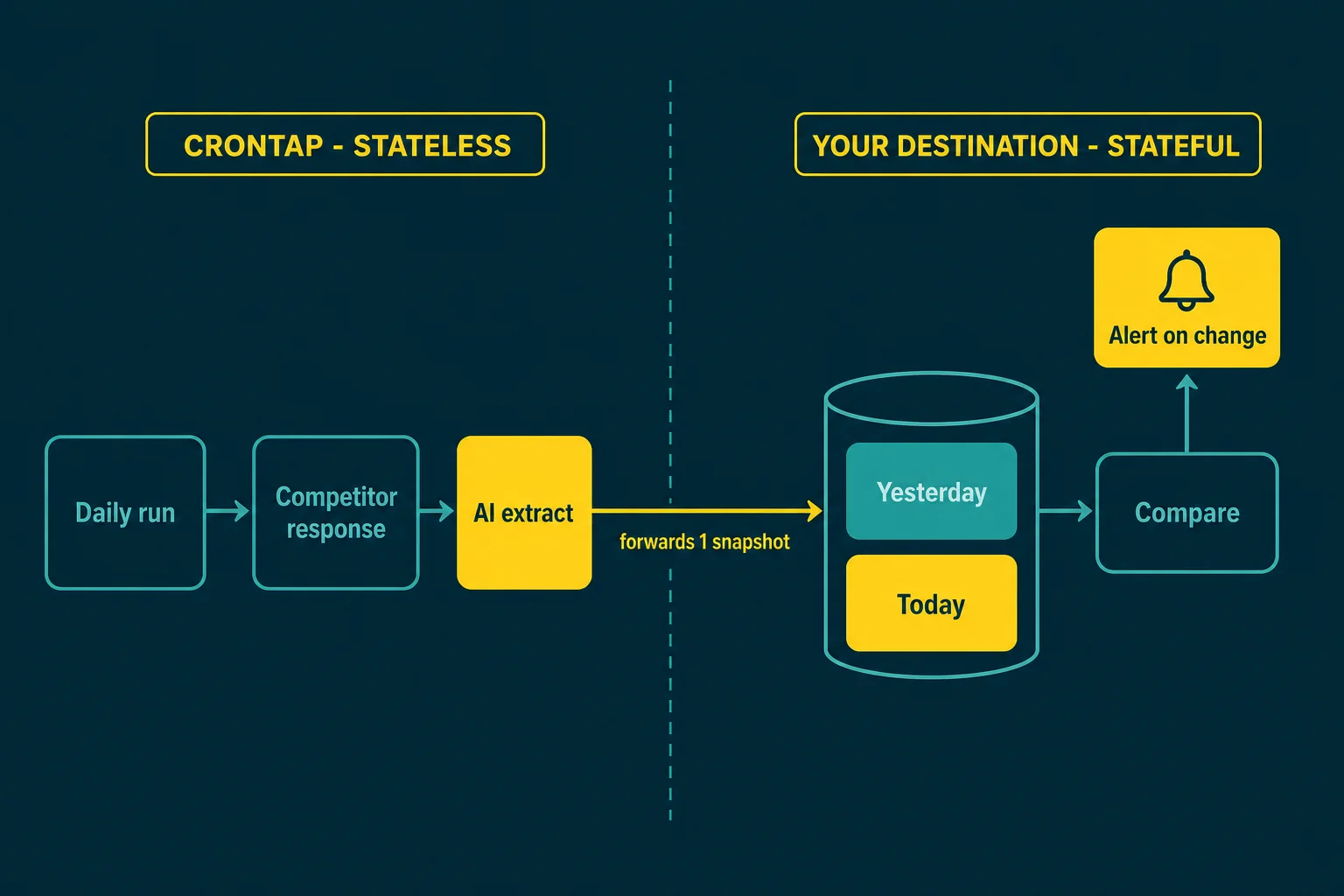
So the diff happens at the destination. A tiny relay (a Make scenario, an n8n function node, a few lines in a Cloud Function) reads aiOutput.plans, compares each plan to the row it stored yesterday, and only pings Slack when a number actually moved:
// at your destination (Make / n8n / Cloud Function), NOT inside Crontap
const prev = await store.get("acme"); // yesterday's snapshot
const next = body.aiOutput; // today's, straight from Crontap
await store.set("acme", next);

const alerts = [];
for (const p of next.plans) {
  const old = prev?.plans.find((x) => x.plan === p.plan);
  if (old && old.monthly_usd !== p.monthly_usd) {
    alerts.push(`${next.competitor} ${p.plan}: $${old.monthly_usd} → $${p.monthly_usd}`);
  }
}

if (alerts.length) {
  await fetch(SLACK_WEBHOOK_URL, {
    method: "POST",
    headers: { "content-type": "application/json" },
    body: JSON.stringify({
      text: `*Competitor pricing moved*\n${alerts.map((a) => "• " + a).join("\n")}`,
    }),
  });
}The arrow in that alert string is a real Unicode arrow inside a code block, which is fine. The store is where the memory Crontap deliberately does not keep ends up living. Swap the store for a Google Sheet, a Postgres row, or an Airtable record and nothing else changes.
In-product AI Integration vs the full DIY pipeline
When do you reach for the lightweight version, and when do you build the real pipeline? Here is the honest split.
| In-product AI Integration (this post) | DIY Firecrawl + GPT pipeline | |
|---|---|---|
| Setup time | Minutes, no code | An afternoon, plus a backend route |
| Handles JS-rendered pages | No (plain GET); use the page's JSON/API or a server-rendered page | Yes (Firecrawl renders the page) |
| True diffing and history | At the destination (Sheet, datastore, DB) | Built in (Sheets history plus a per-run diff) |
| Structured extraction | Yes (Output = JSON) | Yes (strict JSON schema) |
| Model | Picked for you, not selectable | Any (GPT, Claude, whatever) |
| Cost | Crontap Pro ($2.99/mo), no scrape bill | About $8.50/mo (Firecrawl + OpenAI + Crontap) |
| Best for | "Just tell me when Acme moves" | "Watch 12 competitors, 4 plans each, every 6 hours" |
If you outgrow the in-product version (more competitors, JavaScript-heavy pages, real per-run diffing), the Firecrawl and GPT pipeline is the upgrade path. Same idea, more horsepower.
Watching features, not just prices
Same machine, different target. Point the daily schedule at a competitor's /changelog, a releases RSS feed, or a public status JSON, and write a prompt like "List any items dated in the last 7 days as bullet points: title plus a one-line summary." Set Output to Text and forward to Slack. Because a changelog already carries its own recent history, you sidestep the no-memory problem entirely: the feed is the memory, the AI just reads the top of it and summarizes. If you want this to grow into a proper daily digest across several feeds, the feed-to-morning-brief pattern goes deeper on the summarizing side.
FAQ
Can it diff this week against last week on its own?
No. The AI Integration sees only the current run's response and keeps no stored history, so it cannot compare against a previous run by itself. Get "what changed" by forwarding the extracted JSON to a store that holds yesterday's snapshot (a Google Sheet, a Make or n8n datastore, your own DB) and diffing there, or by pointing the schedule at a changelog or RSS feed that already lists recent changes.
Can it read a JavaScript-rendered pricing page?
Often not. The schedule makes a plain HTTP GET, so it sees the initial HTML, not the prices a page paints later with client-side JavaScript. If extraction comes back empty, point the schedule at the pricing JSON or API the page calls, or at a server-rendered page, or move up to the Firecrawl pipeline, which renders the page before extracting.
Is scraping a competitor's pricing page allowed?
Public pricing pages are the cleanest case: they are published precisely so prospects can read them, and a once-a-day GET is gentler than a curious prospect hammering refresh. Still, check the target's robots.txt and terms of service. If /pricing is disallowed for automated access, take it off the list. Marketplaces and review aggregators have stricter rules and are a poor fit for this pattern.
What cadence can I run it at?
On Pro, a saved AI Integration runs at a minimum of once per day, one integration per schedule. On Ultra, it drops to hourly with unlimited integrations per schedule. Daily is the right cadence for pricing anyway: prices rarely move more than once a day, and a gentle cadence keeps you off anyone's rate limiter.
How is this different from the Firecrawl and GPT post?
That post builds a backend route that renders JavaScript pages with Firecrawl, extracts with GPT against a strict schema, stores history in Sheets, and diffs every run, all for roughly $8.50/month across 12 competitors checked every 6 hours. This post is the no-code, in-product version for server-rendered pages and feeds, where the diffing lives at the destination instead of in your code. Start here; graduate there.
References
- Firecrawl
/scrapeendpoint docs - Visualping change detection
- Slack incoming webhooks
- Google's robots.txt introduction and guide
Related on Crontap
- Introducing AI Integrations. The feature this post is built on: transform a schedule's HTTP response with a prompt and forward it anywhere.
- Competitor price monitoring with Firecrawl and GPT. The full DIY pipeline this post is the lightweight sibling of, with real per-run diffing for JavaScript-heavy pages.
- Scheduled AI and LLM jobs use case. The general pattern: an external clock fires a request, an LLM transforms the result, and the output lands somewhere durable.
- Automated data sync use case. For moving the structured snapshots between APIs and stores on a clock.
- Feed to morning brief. The deeper take on summarizing feeds and changelogs into a single daily digest.
Fix this in 60 seconds with Crontap. Free tier available. No credit card. Schedule your first job →