
A deploy rolls out just before a scheduled report. The first request catches a cold start and returns 502. The second would have worked, but until today that first response was enough to fail the run and alert you.
Today Crontap gets a little more patient. Failed scheduled HTTP calls now retry automatically with exponential backoff. Brief server errors, timeouts, and connection problems get another chance before they become your problem.
What ships
Retries are on by default for new schedules. Existing schedules keep their current behavior until you turn retries on in the Advanced section, so this release does not silently replay endpoints you already run.
The default policy makes 3 retries. It waits longer after each failure, for example about 1 minute, then 2 minutes, then 4 minutes. You can allow up to 5 retries. On recurring schedules, Crontap stops before the next scheduled run instead of letting one retry sequence collide with the next fire.
Alerts and integrations run only for the final outcome. A transient 503 that recovers does not send three scary messages. If the retries are used up, the normal failure alert fires with the final result.
Every attempt appears in history. Failed attempts that lead to another try use the amber Retried state, while the last attempt remains the final success or failure used by your reliability stats.
Configure it on the schedule
Open any schedule and expand Advanced. The retry switch is available on every plan.
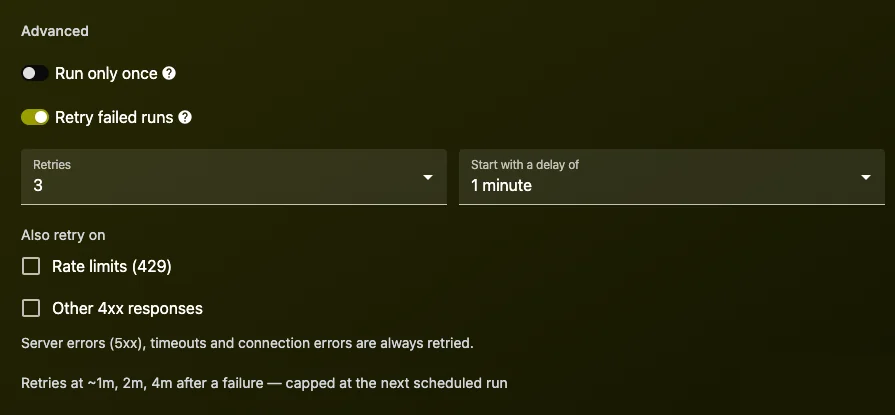
The defaults cover the failures that are usually safe to try again: 5xx responses, timeouts, and connection errors. Pro adds control over the number of retries, the starting delay, and whether that schedule should also retry 429 or other 4xx responses.
429 and other 4xx retries are optional because they depend on the endpoint. A temporary rate limit may be safe to replay. A validation error usually is not.
See every attempt in history
History now shows one row per attempt instead of hiding the work behind the final result. Amber bars make recovered failures visible without counting them as final failed runs.
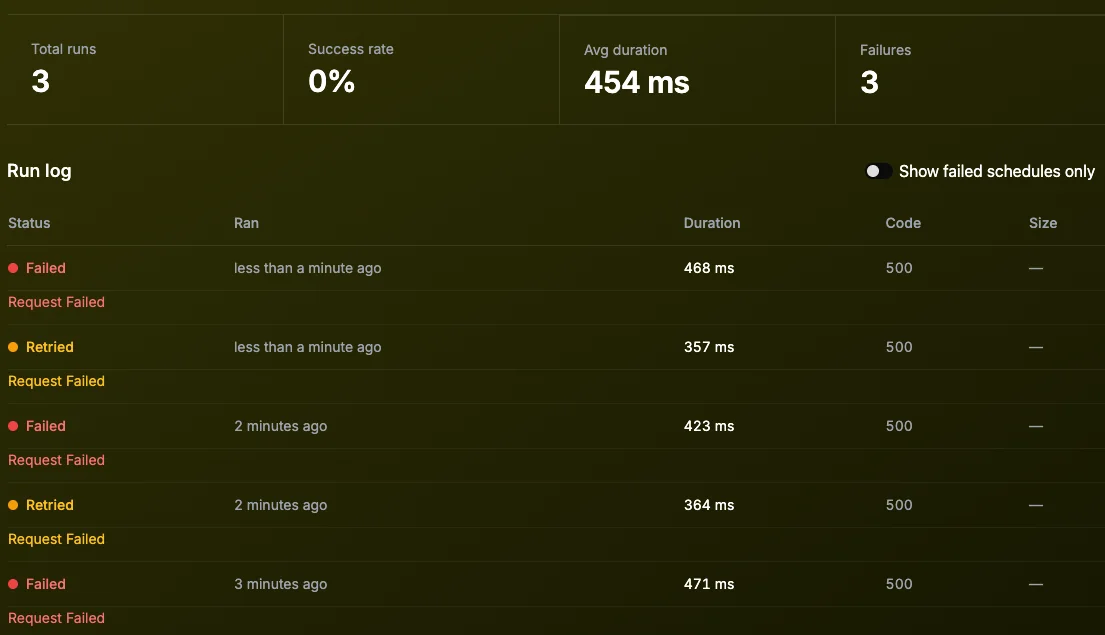
That distinction matters when you are debugging a flaky dependency. You can see that a call needed two attempts today without turning a recovered blip into a failed-run statistic.
Available through the API
The public API accepts and returns retryPolicy on schedules. New schedules use the defaults when the field is omitted, and updates leave the current policy unchanged when it is omitted.
{
  "retryPolicy": {
    "enabled": true,
    "maxRetries": 3,
    "baseDelayMs": 60000,
    "retryOn": ["5xx", "network", "timeout"]
  }
}The retry count, starting delay, and optional response classes follow the same plan rules as the dashboard.
One important safety check
Retries can send the same request more than once. Before enabling them on an endpoint that creates a charge, sends a message, increments a counter, or performs another non-idempotent action, add an idempotency key or make the handler safely recognize repeated work.
If replaying the request could duplicate a side effect and the endpoint cannot deduplicate it, leave retries off for that schedule. The switch is there for exactly that reason.
Fix this in 60 seconds with Crontap. Free forever tier. No credit card. Schedule your first job →